


Everything outstanding, across every firm

What's outstanding, and who has it.

Every open item between firms, from a design question to a safety item, on one record, closed by the side that raised it.

  • Issue to email. Raise it; they answer by email or mark it Done.
  • Every promise on the record. Each new date stays, so the trail shows how often it moved.
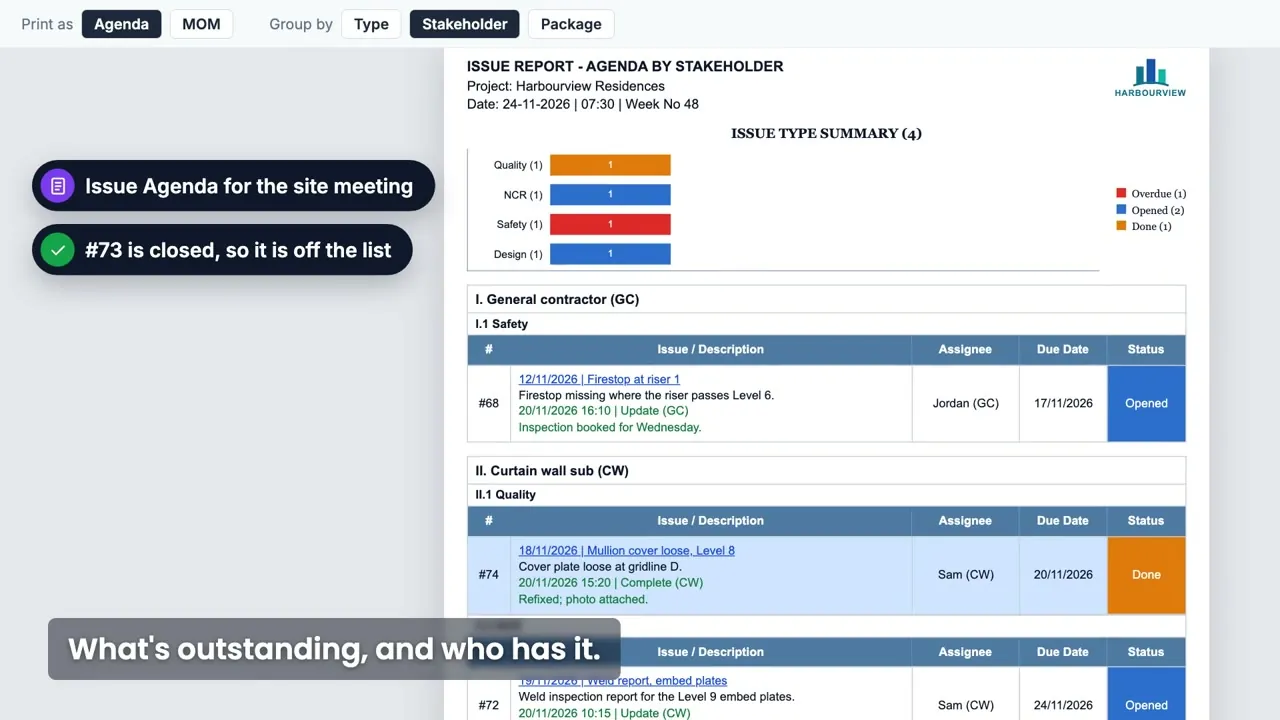
  • Ready for the site meeting. The Issue Agenda prints who holds what, firm by firm, with the latest update on each.

See how an issue moves

Projects running issues on AECIS
Issues demo: the Issue Agenda that shows what is outstanding and who has it, after one issue went from first email to closed
One issue across three firms, from the first email to closed, ending on the Issue Agenda that shows what's outstanding and who has it. It plays muted; turn the sound on for quiet guitar.

Raise it at the spot, with photos. It lands in their inbox. The reply lands on the issue. A quick follow-up, like a social thread. Every promised date on the record. Done by the firm that fixes it. Closed by the firm that raised it. What's outstanding, and who has it.

One issue, from the first email to closed

Three everyday moments between firms, and how each one runs.

1Issue to email0:05 in the video

Raised, and it lands in their inbox

The envelope consultant raises a sealant gap for the general contractor, who gets it by email. The answer comes straight from the inbox, as a Reply All that lands on the issue's timeline, or as a Done in the app. Either way, it is on the issue.

2Following up0:10 in the video

A quick follow-up, like a social thread

The consultant checks in from the phone with an @mention: the curtain-wall sub gets it by email and on the issue's timeline, and answers with a photo. Comments, replies and photos stay in one thread, on the phone or the web.

3When a date slips0:14 in the video

Every promised date on the record

The sub promises Thursday, then moves it to Friday. Each new date goes in as the confirmed date, and the earlier ones stay on the record, so everyone sees how many times it moved.

Deadlock-free by design

Done by the firm that fixes it. Closed by the firm that raised it. When the work is already finished on site, the creator or a colleague such as document control closes it, with or without a Done.

If the work comes back, Reopen it, to the same or a new assignee.

  1. Raise

    Anything outstanding: design, payment, NCR, safety, quality or a site observation, with one assignee at any firm and a due date.

  2. Assign and email

    The firm it is for gets it by email and answers from the inbox or in the app. Every action is emailed, with a link back to the issue.

  3. Follow up, promise dates

    An @mention note is the quick reminder. Each new promised date goes in as the confirmed date, and the earlier ones stay on the record.

  4. Close

    The assignee's side marks it Done with a note and an after photo; the side that raised it checks and closes, with or without a Done.

  5. Record and report

    Every change is on the record, and the open list prints as the Issue Agenda for the site meeting.

Full rules: the Issue guide on help.aecis.com

The Issue Agenda for the site meeting

What's outstanding, and who has it, on one page. Before the weekly meeting, print the open issues as an agenda, so the meeting starts from the record.

Firm by firm

Group the agenda by firm, by issue type or by package, so each firm finds its own items.

Raised, then the latest

Each row shows the problem as raised, with the latest update under it: date, action and firm.

Status at a glance

A summary chart by issue type opens the report, and every row carries its status colour.

Minutes and Excel too

The same filtered list prints as meeting minutes, or exports to Excel.

Everyday questions, answered on the issue

What can we track?

Track anything outstanding between firms: design, payment, NCR, safety, quality and site observations. Each one is an issue type set up per project.

Where on site is it?

An issue raised from the drawing carries its spot, with photos, video and markup. Or start it from blank, on the phone or the web. Quality control on the drawing lives in DMaps. More on DMaps

Who holds what, across every firm?

One list across every firm shows who holds each issue and when it is due. Each firm sees the issues it is part of, and the project owner and administrators see them all.

Who checks the fix?

Done by the firm that fixes it, closed by the firm that raised it: the assignee's side completes it with a note and an after photo, and the side that raised it checks and closes.

Also included

  • A day's new issues as one email at close of business
  • A reminder every Monday while an issue is overdue
  • Reassign, reopen, or cancel with a reason
  • Meeting minutes, Excel, filters and saved views
  • Links to submittals, other issues and risks

Can I follow up from site?

Comment, @mention, add photos or mark it Done from the phone app. With no signal, it waits in a queue and sends when the signal is back.

Bulk actions, exports, list columns and the overdue flag are on the web app; raising, following up and closing work on the phone too.

Try it on your next site meeting

Start your project and raise the first issue yourself, or book a 20-minute demo and we will set it up on your project with you.

Before the first issue

Questions project teams ask

What owners, consultants, contractors and trades ask us most, answered in a line or two.

Still have a question?

The Issue guide walks through every action, or we can show it on your project.

How do outside firms take part?

From the email they receive, or on the web or the phone app. A Reply All lands on the issue's timeline, and a lost email can be forwarded in.

What happens when a date slips?

The new promised date goes in as the confirmed date, and the earlier ones stay on the record.

The work is finished on site. Who closes the issue?

The side that raised it, or a colleague such as document control, closes it with a note, with or without a Done from the other firm.

Who sees an issue?

Each firm sees the issues it is part of, and the project owner and administrators see them all. Private keeps an issue, or one action's note, to the people on it.

Other features

9 features are included in 1 platform - easy access, easy manage your projects.